How to Track Plot Threads Across a Novel
Follow every storyline through a novel, chapter by chapter, so subplots don't go quiet and promises get paid off. Works for plotters and pantsers.
Tracking plot threads means writing down, chapter by chapter, what happens to each storyline in your novel, so you can see at a glance which ones have gone quiet and which promises you haven't paid off yet. It takes an evening with a draft or an outline, and it catches problems that are nearly invisible when you read the book front to back.
Most novels run more than one storyline: the main plot, a subplot or two, a relationship, a question the reader wants answered. In a 90,000-word draft it's easy to set one of them down in chapter 6 and not pick it up again until chapter 19, by which point the reader has forgotten it. It's just as easy to plant a hint you never come back to. Neither shows up when you reread a chapter at a time, because each chapter is fine on its own.
The plot grid
The simplest tool for this is a grid: chapters down the side, one column per thread, and a line in each cell for what happens to that thread in that chapter.
J.K. Rowling famously planned Harry Potter and the Order of the Phoenix this way. A handwritten page of her plan covers chapters 13 to 24, with columns for the prophecy, the Cho and Ginny storyline, the D.A., the Order, Snape and Harry, and Hagrid and Grawp. A sheet of lined paper is enough.
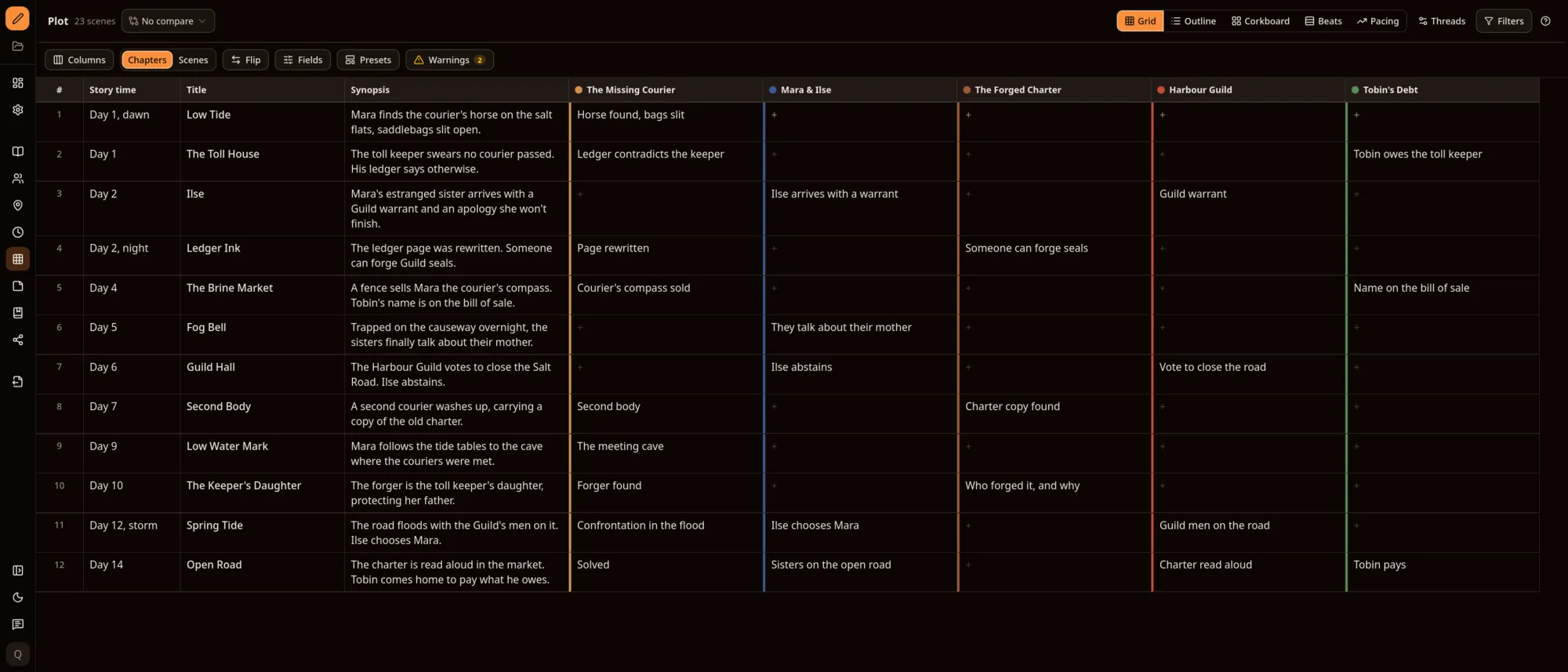 The Plot grid in Asermu with the Rowling preset: twelve chapters down the side with story time, title and synopsis, and one column for each of five threads, from The Missing Courier to Tobin's Debt. Empty cells show where a thread has nothing happening.
The same layout in Asermu, using its Rowling preset on an example novel.
To make your own:
- List your threads. Name every storyline you're following. Five or six is common; if you have fifteen, some are probably details of a bigger one.
- Add a column for when. Story time (the day, month or season) is worth a column, because it's where continuity errors hide.
- Fill one line per cell. What happens to this thread in this chapter, in a few words. Leave the cell empty if nothing does.
- Read down each column. Then read across each row.
What to look for
Reading down a column shows you a thread's whole arc. Three things are worth checking:
- Quiet stretches. A run of empty cells means the thread has disappeared from the page. Sometimes that's fine. Often it means the reader will need reminding, or the thread needs a scene in the middle.
- Missing payoffs. If a thread raises a question, plants a clue or makes a promise, find the chapter where it pays off. If you can't, either write that chapter or cut the setup.
- Closing order. Some writers like threads to close in roughly the reverse order they opened, with the biggest question resolved last. Plenty of good books ignore this, so treat it as a question to ask, not a rule.
Reading across a row shows you how busy each chapter is. A chapter where every thread moves can feel crowded; a chapter where none does is a candidate for cutting or merging.
Plotters and pantsers
If you plan before you draft, the grid is your outline. Fill it from your beat sheet or three-act plan, using the steps in our guide to outlining a novel, and break each chapter into scenes with the goal, conflict, disaster template.
If you discover the story as you write, leave the grid alone until the draft is done. Then fill it in from what's actually on the page. This is a reverse outline, and it's the best starting point for the structural pass in our three-pass revision checklist: you're looking at the shape of the book, not its sentences.
Either way, don't audit your threads while you're drafting. A first draft is supposed to have loose ends. Warnings about them on day 12 don't help anyone finish.
Checking pace and structure
Two more checks are worth doing once the grid is filled in.
Scene length across the book. Chart every scene by word count, in order. Long stretches and short bursts show up at once, and so does a middle that sags. If you rate each scene's tension, plotting that on top shows whether the book builds or flattens.
Your story against a structure template. If you used a beat sheet, check where each beat actually landed. A midpoint at 35% of the words, or an all-is-lost moment that never happened, is easier to fix once you can see it.
Doing this in Asermu
We've just rebuilt Asermu's Plot module around exactly this way of working. The help pages cover every part of it; here's how the steps above map onto it.
Threads and plot points. Add your storylines in Threads at the top of Plot, each with a name, a colour and an optional description. A plot point is what happens to one thread in one chapter, and each thread has one per chapter. The Grid shows them as chapters down the side and threads across the top, like the paper version. You can also mark the scenes where a plot point happens, and the same plot points show in the outline, on the corkboard as colour stripes, in scene details and as thread dots above the manuscript. Edit one anywhere and it changes everywhere.
Columns and presets. Add columns next to your threads: synopsis, story time, POV, location, status, word count, position in the book, or a template's beats. You can add your own chapter or scene fields too. Presets set the columns up for a way of working: Rowling (story time, synopsis and threads), Story Grid (a row per scene with value, polarity, turning point, POV and location), Structure check, Pacing and Minimal. A preset only changes the columns, and Undo layout puts the old ones back. The grid can also switch to a row per scene, or flip so threads are rows and chapters are columns.
Warnings that wait for revision. The grid can warn you about a thread with no plot point for 5 chapters (you choose how many), and about a thread you've ticked as Needs a payoff without picking the payoff chapter. Threads closing in a different order than they opened is an extra check, off unless you turn it on. Warnings are off while you're drafting and on while revising or editing, following the writing phase you set in Settings, and you can switch them on or off any time from Warnings in the grid, or turn them off from the Plot tab beside the manuscript.
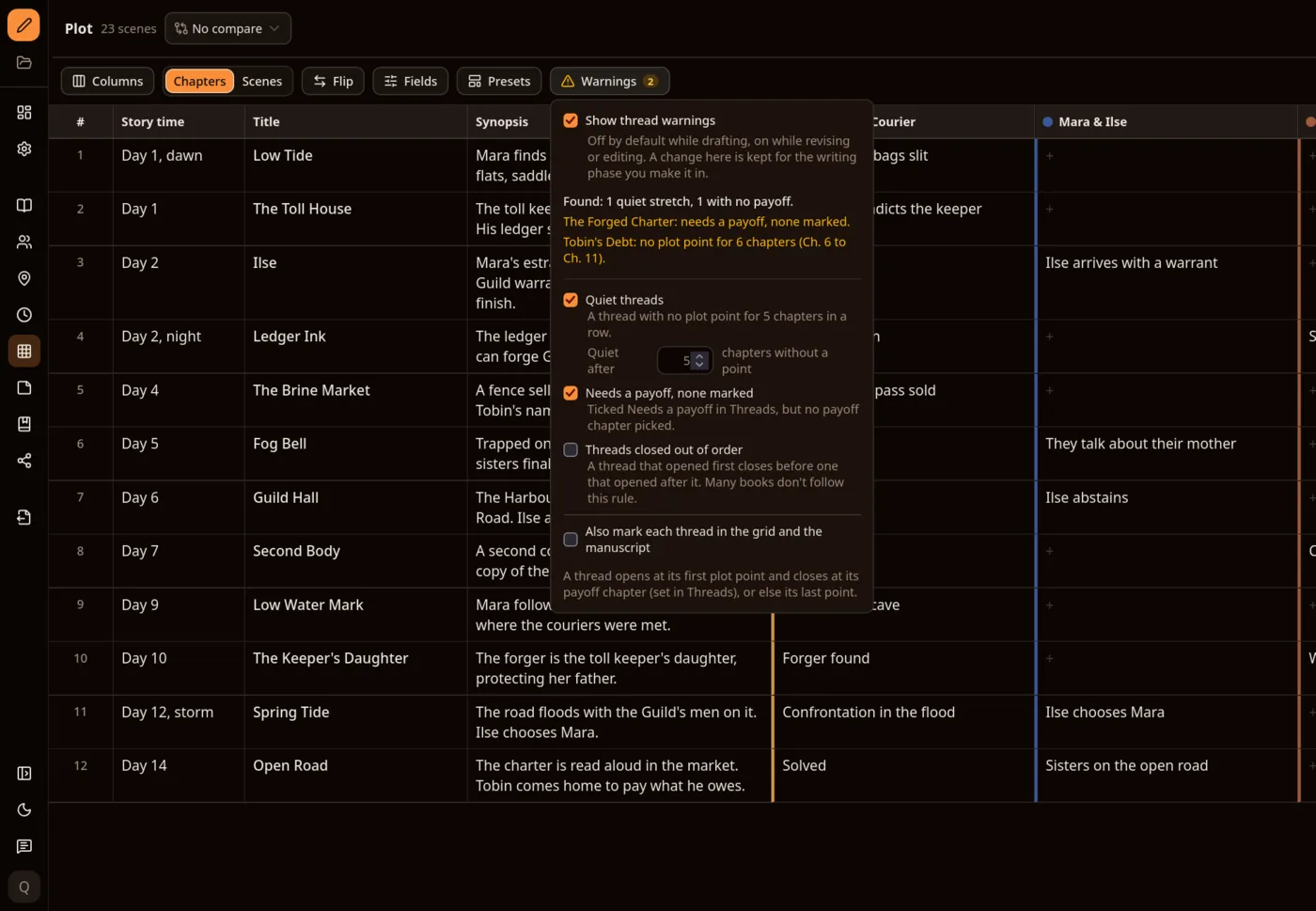 Asermu's Warnings menu open over the Plot grid, listing two findings: The Forged Charter needs a payoff with none marked, and Tobin's Debt has no plot point for 6 chapters, from chapter 6 to 11.
Pacing. The Pacing view charts every scene by length, with chapter bands, the 25, 50 and 75% marks and a line for a typical scene. Tension is drawn on top, and dialogue % shows under each scene when your quote marks can be measured. Once the book has 10 scenes and 5,000 words, a few flags point out extremes, such as a scene at least three times the length of a typical one. They're counts, not a reading of your story, so you can turn flags off or dismiss one that's intentional.
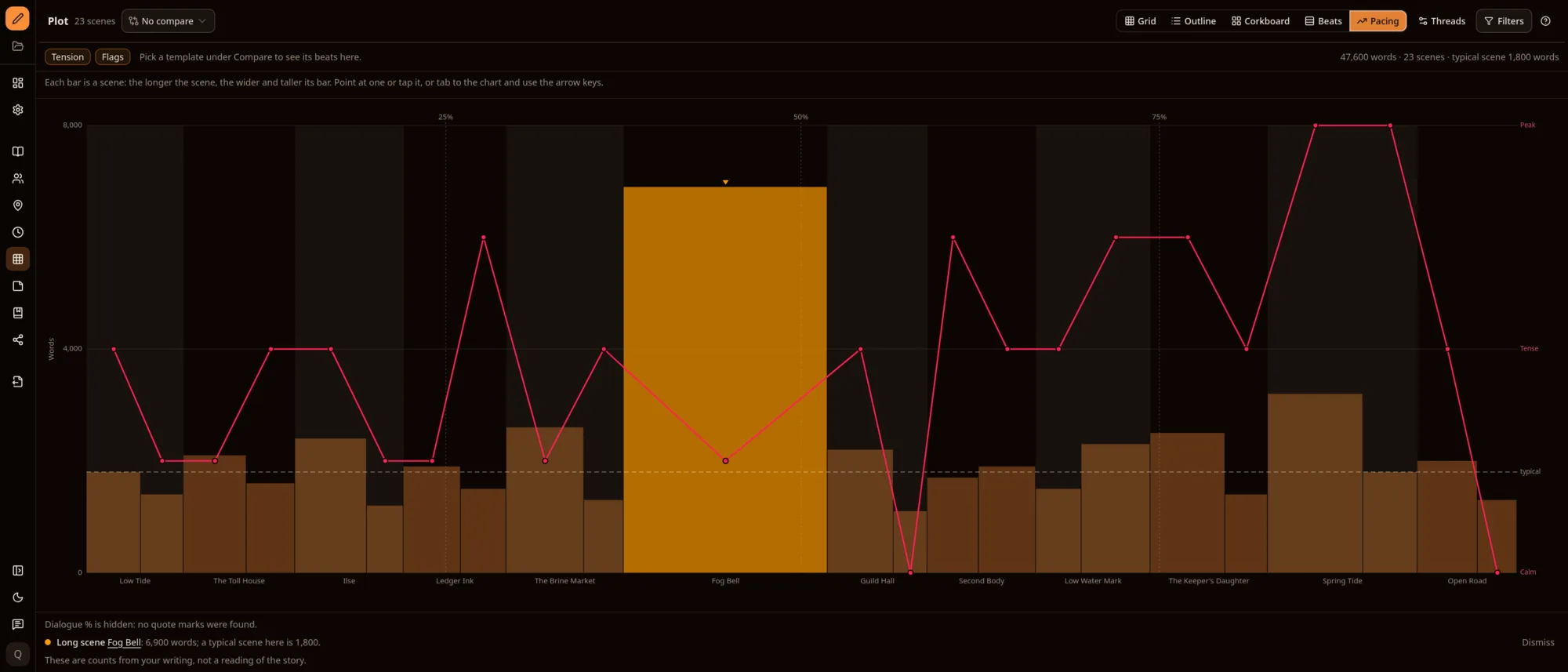 Asermu's Pacing view: one bar per scene, sized by word count, with chapter bands, the 25, 50 and 75% marks, a dashed line for a typical scene and a red tension line. The longest scene, Fog Bell at 6,900 words, is highlighted and flagged as a long scene.
Compare. Pick a structure template from Compare at the top of the Grid or Pacing view. The grid shows the template's beat column, with each missing beat as a dimmed row where it should fall, and Pacing marks where each beat should be and where it is. Comparing changes nothing in your story. If the built-in templates don't fit, you can make your own beat sheet and compare against that.
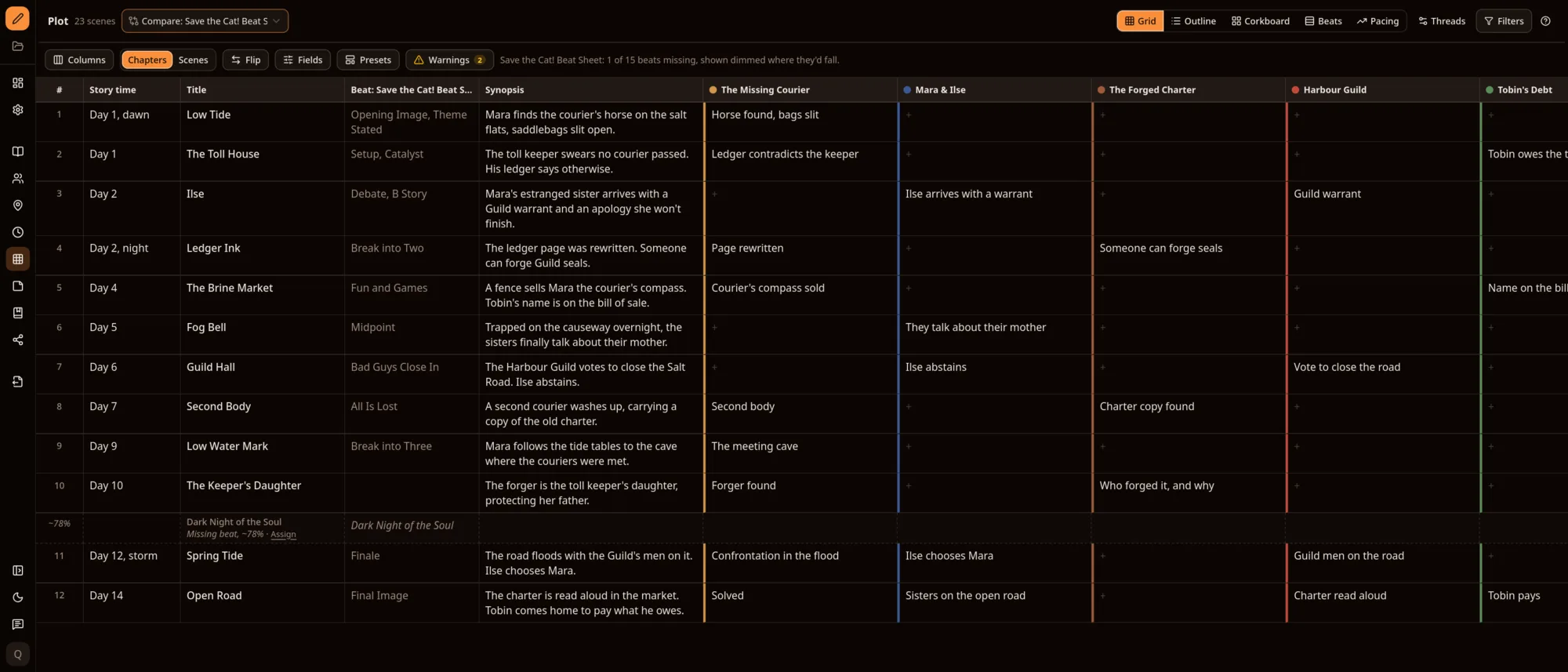 The Plot grid comparing against the Save the Cat! beat sheet: a beat column shows which beats each chapter carries, and the one missing beat, Dark Night of the Soul, appears as a dimmed row at about 78% of the book.
While you write. The Plot tab beside the manuscript shows each thread's point before and after the chapter you're in, so you can keep a thread moving without leaving the page.
Plot is part of the Writer plan and above. Like the rest of Asermu, it works offline, your manuscript is stored on your device, and there are no AI writing features: the grid shows you what's on the page and leaves the decisions to you. The full list of changes is in the changelog.
Follow every thread
Asermu is free for your first project. Plot comes with the Writer plan. No credit card required.
Get started freeI build Asermu, so treat the section about it accordingly.
Frequently asked questions
- What is a plot thread?
- A plot thread is one storyline you follow through a novel: the main plot, a subplot, a relationship, a mystery. Most novels run several at once, and each needs to move forward, or at least be remembered, every few chapters.
- How do I keep track of subplots in a novel?
- Make a grid with chapters down the side and one column per thread, and write one line in each cell for what happens to that thread in that chapter. Empty runs of cells show where a thread has gone quiet, and the last cell in each column shows whether it was ever resolved.
- Should pantsers track plot threads?
- Yes, but after the draft rather than before it. Write the draft freely, then fill in the grid from what's on the page. It works as a reverse outline and gives you a map for the structural revision pass.
- How often should a subplot appear?
- There's no fixed rule. A gap of four or five chapters is a reasonable point to check whether the reader still remembers a thread, but a long gap can be deliberate. The grid's job is to show you the gap so you can decide.