How to Format a Novel Manuscript After NaNoWriMo
Standard novel manuscript format, setting by setting: font, spacing, margins, headers and title page, plus which file to send agents, editors and KDP.
Standard novel manuscript format is 12-point Times New Roman, double spaced, with one-inch margins, a half-inch first-line indent, and a header showing your surname, title and page number. It is the plain layout agents and editors expect, and it exists to make a long document easy to read and mark up. It is not how your finished book will look.
There is no single official standard. The settings below are the common ground between guides from people who work in publishing, and an agent's own guidelines overrule all of them.
If November's draft is still warm, it doesn't need any of this yet. Do your revision passes first, and format when the book is ready for someone else to read. If you have finished a draft this month, for NaNoWriMo or one of the challenges that replaced it, well done.
The settings
| Setting | Use |
|---|---|
| Font | Times New Roman, 12pt, black |
| Line spacing | Double, with no extra gap between paragraphs |
| Margins | 1 inch on all sides |
| Alignment | Left, not justified |
| Paragraphs | 0.5 inch first-line indent, set as an indent, not with spaces |
| Header | SURNAME / TITLE / PAGE, top right, with a shortened title |
| Page numbers | Start after the title page |
| Chapters | New page, using a page break, not repeated returns |
| Scene breaks | A centred # or three spaced asterisks |
| Page size | US Letter in the US and Canada, A4 most elsewhere |
These come from Reedsy's manuscript format guide and Nathan Bransford's, an author and former literary agent. William Shunn's long-running novel format examples show the same shape of page and title page.
Guides differ in the details. Bransford calls Courier outdated, for instance, and he accepts a page number in the header or the footer. Reedsy suggests starting each chapter about a third of the way down the page. None of that is worth worrying about once the basics are right.
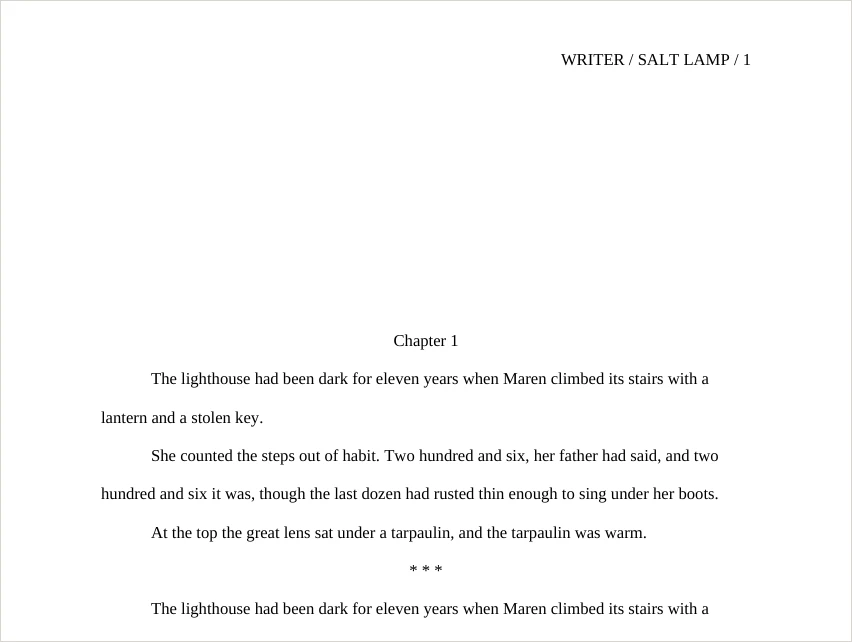 A manuscript page exported from Asermu: running header, chapter heading a third of the way down, double-spaced indented text and a scene break.
The title page
Keep it plain. Include the title, your name, your contact details and the word count, rounded to the nearest thousand. Reedsy and Bransford also list the genre. Leave out cover art, a copyright page and acknowledgements, because a manuscript should look like a manuscript and not a finished book.
Which file to send
| Sending to | File |
|---|---|
| Agent or publisher | What their guidelines ask for. If they don't say, DOCX |
| Freelance editor | DOCX, unless they say otherwise. Editors work in it directly |
| Beta readers | Whatever they read comfortably, often EPUB or PDF |
| Kindle Direct Publishing (ebook) | DOCX, EPUB or KPF |
KDP's help pages list Word, KPF and EPUB among their recommended ebook formats, and call KPF, made with Kindle Create, a go-to method for avoiding formatting issues. A book you publish yourself shouldn't be in manuscript format at all, because readers want a proper book layout, so treat that as a separate job. Check the result in KDP's previewer before you publish.
Doing this in Asermu
Asermu's Compile screen does this for you. Set Format to DOCX and choose the Standard Manuscript preset. It sets Times, 12pt, double spacing, US Letter and one-inch margins, and it turns on Manuscript format, which adds:
- a running header with your surname, a shortened title and the page number
- page numbers that start after the title page
- half-inch first-line indents on body text
- plain, centred chapter headings about a third of the way down the page
- the word count on the title page, rounded to the nearest thousand
Every chapter starts on a new page, and scene breaks come out as three spaced asterisks.
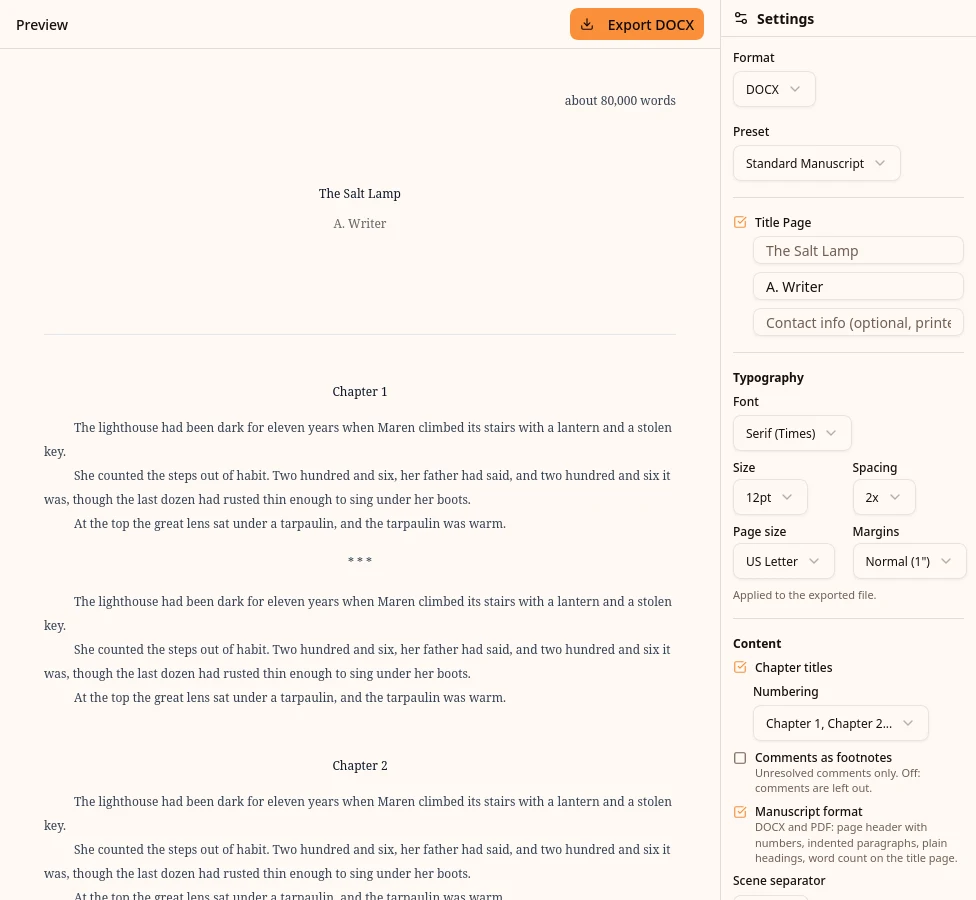 Asermu's Compile screen with the Standard Manuscript preset and Manuscript format ticked, previewing a title page that reads about 80,000 words.
A few things to check before you export:
- Your name: fill in the author field on the title page. The header uses the last word of it as your surname.
- Contact details: the contact field prints centred under your name. If an agent wants them in a corner of the page, move them in Word.
- Page size: switch to A4 if you're submitting outside North America. The preset label then shows Custom, and Manuscript format stays on.
- Scene breaks: if a guideline asks for a #, choose Custom under Scene separator and type one.
- Short title: the header drops a leading "The", "A" or "An" and keeps the next three words. Edit it in Word if that reads badly.
The page image above came from a DOCX exported this way. Writers on any plan can export DOCX, Markdown and plain text. PDF and EPUB come with Pro and Lifetime. Manuscript format applies to DOCX and PDF.
Write it, then export it
Asermu is free for your first project, with DOCX export included. No credit card required.
Get started freeA last check before you send
- Open the file in Word or Google Docs and read the first and last pages.
- Confirm that every chapter starts on a new page and none is missing.
- Check that accented characters and italics survived.
- Compare the word count with what you expect.
- Read the agent's guidelines one more time.
I build Asermu, so treat the section about it accordingly. Settings and guidelines were checked on 5 November 2026. Publishers change their requirements, so check the source before you submit.
Frequently asked questions
- What is the standard format for a novel manuscript?
- 12-point Times New Roman, double spaced, with one-inch margins, left-aligned text and a half-inch first-line indent. Each page carries a header with your surname, a short title and the page number, and each chapter starts on a new page. There is no single official standard, so an agent's or publisher's own guidelines always come first.
- Should a manuscript be in Times New Roman or Courier?
- Times New Roman 12pt is the safe default. Author and former literary agent Nathan Bransford calls Courier outdated, and agents who want something else will say so in their guidelines.
- What file format should I send a literary agent?
- Whatever their submission guidelines ask for. If they don't say, a Word document (.docx) is the usual choice, and if they ask for a PDF, send a PDF.
- What file do I upload to Kindle Direct Publishing?
- KDP's suggested ebook formats are Word (DOC/DOCX), KPF and EPUB. KDP calls KPF, made with its free Kindle Create tool, a go-to method for avoiding formatting issues. Manuscript format is for submissions, so a self-published book needs a reader-facing layout instead.